FIELD GUIDE
Steering Claude Code: skills, hooks, subagents and more
Claude Codeの挙動は一枚の巨大なCLAUDE.mdで決めるものではない。指示の寿命、読み込まれるタイミング、 コンテキストコスト、強制力に応じて、置き場所を分ける必要がある。
Instruction Map
元記事は、Claude Codeに指示を渡す7つの方法を、読み込みタイミング、圧縮後の残り方、 コンテキストコスト、用途で比較している。すべてをCLAUDE.mdに集めるほど、毎回のセッションに不要な指示が載り続ける。
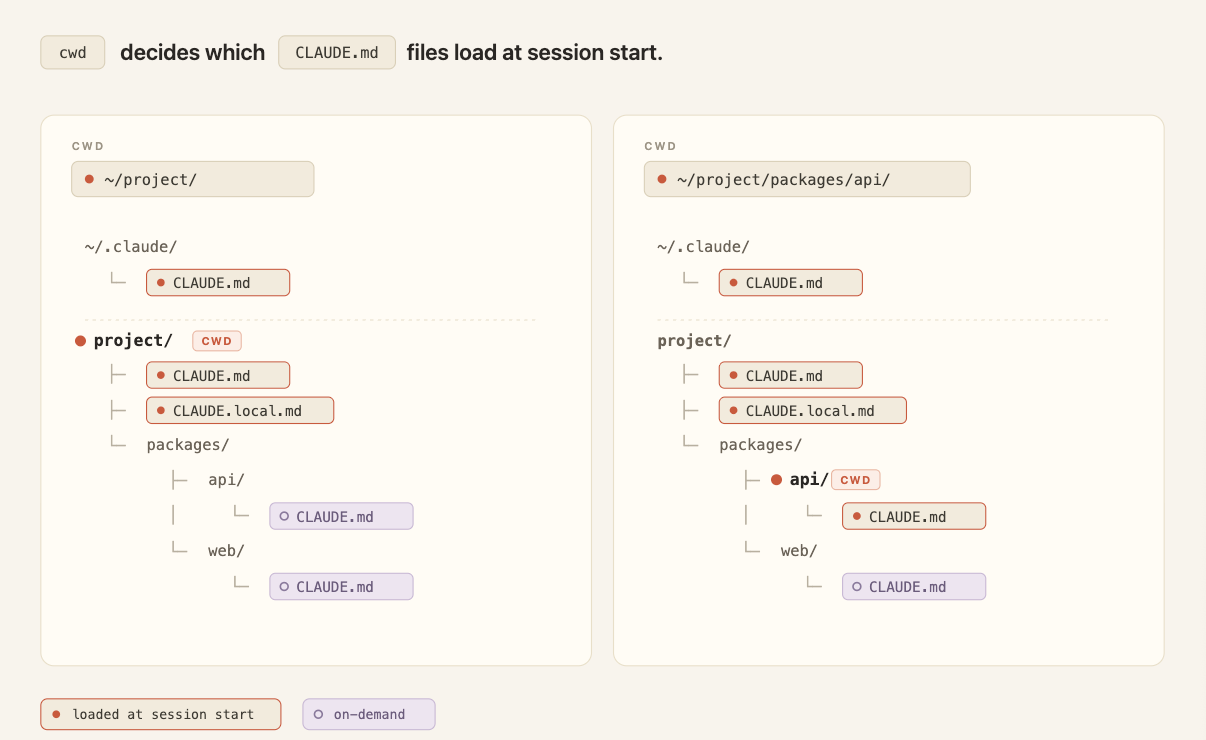
| Method | Loaded When | Compaction | Best Use |
|---|---|---|---|
| CLAUDE.md root | Session start | Read once, cached, then re-read after compaction | Repository facts, build commands, layout, conventions, team norms |
| CLAUDE.md subdirectory | When files under that directory are read | Lost until the subdirectory is touched again | Directory-specific conventions |
| Rules | Session start, or only when matching paths are touched | Re-injected after compaction | Specific constraints, especially path-scoped rules |
| Skills | Name and description at start; body when invoked | Invoked skills re-injected within a shared budget | Procedural workflows, release checklists, reviews, deployments |
| Subagents | Name, description, and tools at start; body only inside agent run | Only the final summary returns to the main session | Parallel or isolated side tasks such as deep search and log analysis |
| Hooks | Lifecycle events | Bypass compaction | Deterministic automation and enforcement |
| Output styles | Session start | Never compacted | Major role or communication style changes |
| Append system prompt | Invocation start | Never compacted for that invocation | Temporary additive standards, tone, formatting, or domain context |
Decision Rule
判断は「この指示をどれだけ頻繁に、どの範囲で、どの強さで効かせたいか」から始める。 手元の好みや一時的な作業指示を、共有リポジトリの常時ロード文書に入れるほど、将来のセッションを重くする。
Always Known
全員が毎回必要とする構造やコマンドだけをroot CLAUDE.mdに置く。
Scoped
特定ディレクトリやファイル種別だけの制約は、subdirectory CLAUDE.mdやpath-scoped rulesへ寄せる。
Procedural
30行の作業手順、リリース手順、レビュー手順はskillsにして、必要なときだけ本文を読む。
Deterministic
絶対に実行したい、または絶対に止めたい処理はpromptではなくhooksやpermissionsで制御する。
迷ったら、root CLAUDE.mdを増やす前に「これは常時ロードされる価値があるか」と確認する。 ないなら、scope、skill、hook、subagentのどれかに逃がす。
Seven Surfaces
7つの仕組みは競合する選択肢ではなく、違う故障モードを避けるための配置先である。 何でも強い指示として書くのではなく、必要なコンテキスト量と実行保証を切り分ける。
CLAUDE.md
rootのCLAUDE.mdは、プロジェクト全体の地図として使う。記事では200行未満に保ち、ownerを持ち、 code reviewの対象にすることが推奨されている。monorepoでは、各チームのディレクトリにsubdirectory CLAUDE.mdを置くと、 関係ないチームの指示を読み続けずに済む。
Rules
rulesは制約や規約を表す。特に重要なのはpath scopeで、たとえばAPI handlerだけにZod validationを求めるなら、 そのpathsにだけ効くruleとして置く。unscoped ruleは機械的にはCLAUDE.mdと同じく常時ロードされる。
Skills
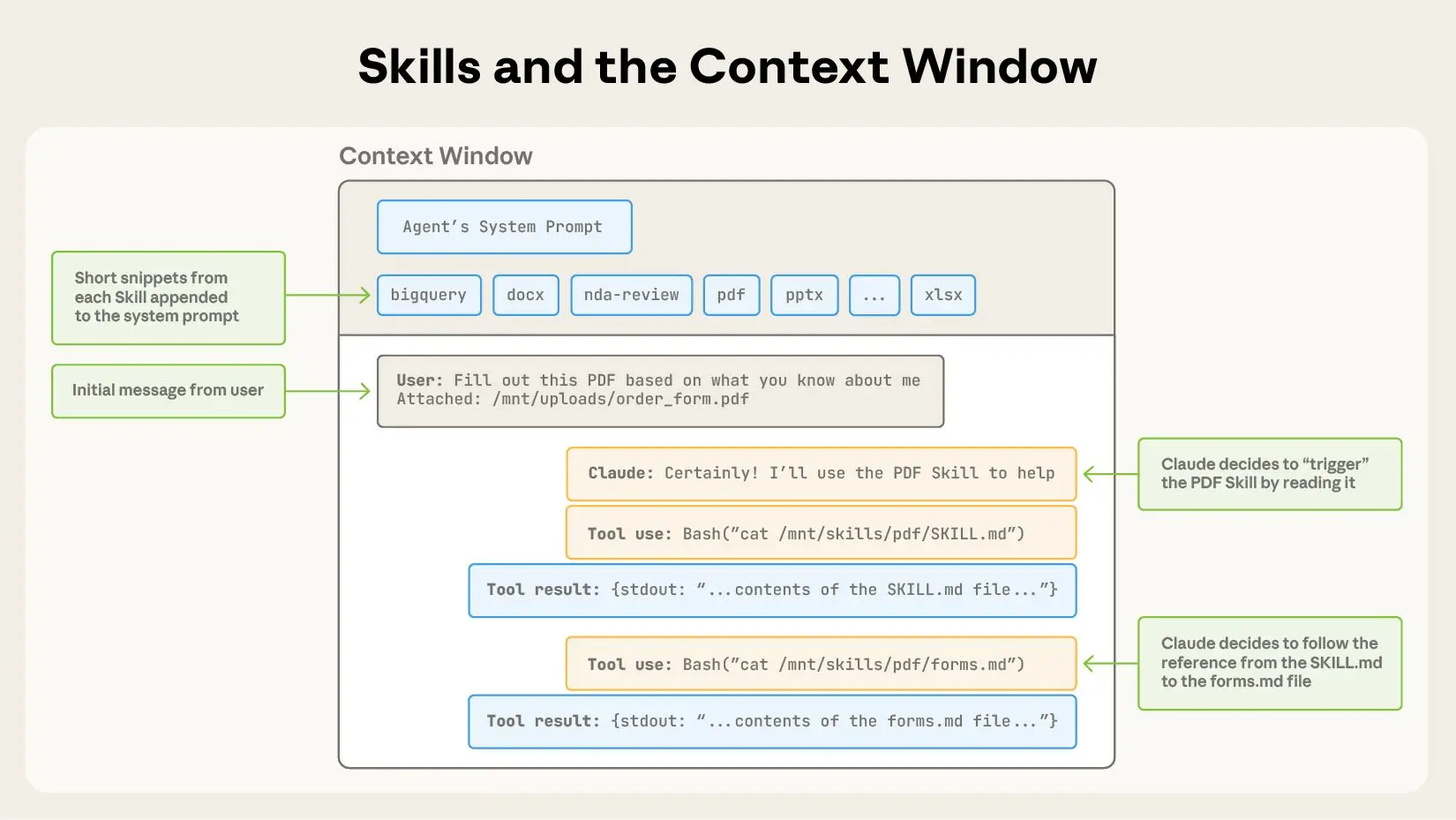
skillsは、名前と説明だけが常時見えて、本文は呼び出したときに読まれる。deploy、release、code reviewのような 手順化された作業に向く。コンパクション後は、呼び出したskillsが共有予算内で再注入され、古いものから落ちる。
Subagents
subagentsは、孤立した別コンテキストで走る補助エージェントだ。main sessionにはbodyが入らず、 最終サマリーとmetadataだけが返る。深い検索、ログ解析、dependency auditのように、中間結果を本流に残したくない作業で使う。
Hooks
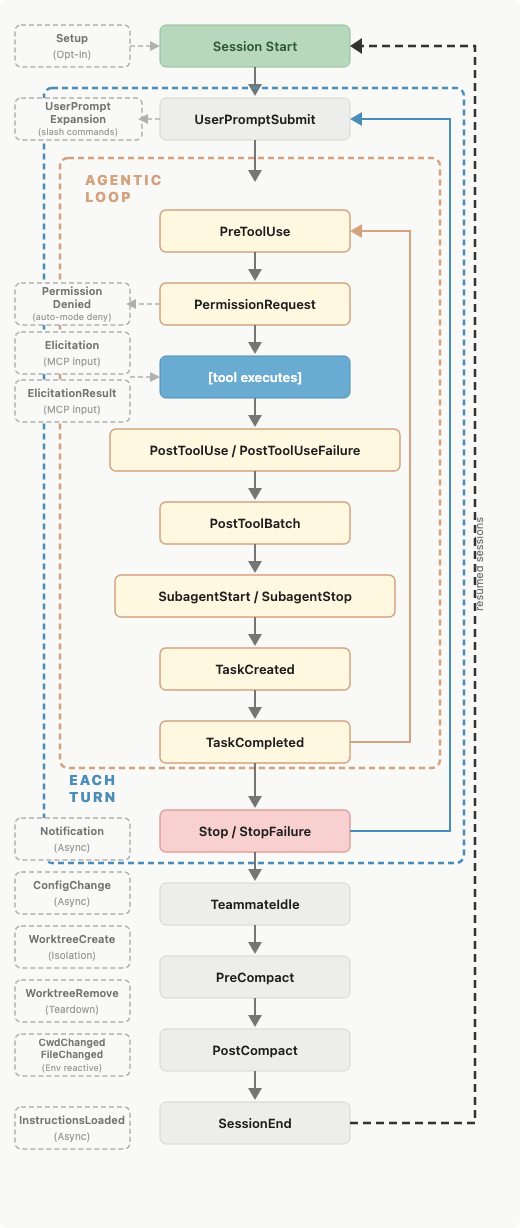
hooksはlifecycle eventで発火するコマンド、HTTP endpoint、LLM prompt、agentである。 formatter実行、Slack通知、危険なtool callのblockのように、モデルの判断に任せず確実に走らせたいものに向く。
Output Styles And System Prompt Append
output stylesはsystem promptに入り、default coding assistantとしての重要な振る舞いを置き換える可能性がある。 大きな役割変更には使えるが、濫用するとengineering assistantとしての基本動作まで失う。append-system-promptは加算型なので、 その起動だけに効かせたいtone、format、domain standardの追加に向く。
Failure Modes
元記事の後半は、指示の置き場所を間違えたときの典型例を挙げている。ポイントは、promptは便利だが、 低コストでも強制力でも万能ではないということだ。
| Smell | Problem | Move It To |
|---|---|---|
| Every time X, always do Y in CLAUDE.md | モデルが選ぶ運用になり、確実には実行されない | Hook in settings.json |
| Never do this in CLAUDE.md | 長いセッションや曖昧な状況で破られる可能性がある | Hooks, permissions, managed settings |
| 30-line procedure in CLAUDE.md | 関係ないセッションにも長い手順が毎回載る | Skill |
| API-only rule without paths | docs作業などにもAPI制約が常時ロードされる | Path-scoped rule |
| Personal preference in project CLAUDE.md | 個人の好みがチーム共有ルールになる | User-level file or local preference |
Next Moves
実務で最初にやるべきことは、新しい仕組みを全部導入することではない。既存のCLAUDE.mdを読み、 常時ロードする価値がない指示を見つけ、移動先を決めることだ。
1. Keep repository facts and essential commands in root CLAUDE.md.
2. Move directory-specific conventions closer to the directory.
3. Convert long procedures into skills.
4. Add path scopes to rules that only apply to part of the tree.
5. Use hooks or permissions for deterministic enforcement.
6. Use subagents when the side task should not pollute the main context.
7. Avoid output styles unless you intentionally want a major role change.
Original source: Steering Claude Code: skills, hooks, subagents and more . Linked references in the clipping include the docs for skills, subagents, hooks, output styles, and the Claude Code best practices.